Orchard records
Orchard records, tree by tree
Trees n Bees is a field logbook for small orchards that sell what they grow. Every tree has its place on a grid that matches your rows, and the sprays, work, bloom dates, photos and harvests your team records against it build up season by season, so you can see what each tree and block has had and what it gave back.

Every tree in its place
Lay out each orchard as rows and trees per row, the way you walk it. A property can have several orchards, each with its own layout and spacing.
- Species, variety, rootstock and planting date for every tree.
- Names are suggested as you type: the ones your property already uses, then about 40 orchard crops with varieties and rootstocks commonly grown in Australia, and newer protected varieties. Typing a market name such as Pink Lady finds the variety.
- Place trees on the property map over satellite imagery, with their canopy drawn to size.
- Group a variety into a block, then record its work and harvest once for the whole block.
Planting a new orchard? Plan it first →
Bring your trees in from a spreadsheet
Already have a list of your trees? Import a CSV with the row and position of each tree, and any of its block, species, variety, rootstock, supplier, planting date and notes. Trees n Bees shows what will change before anything is saved, grows the grid to fit and makes the blocks the file names. A template downloads from the same place, and the Trees sheet of the spreadsheet export goes back in too.
Change many trees at once
Tick the details to change, such as the variety, rootstock or planting date, and apply them to the whole orchard, one block, or only the trees you pick on the grid. Each detail shows what the trees hold now. Change every tree or only fill in the blanks, and undo it if it wasn't what you meant.
To pick trees on a computer, Ctrl+click them (⌘+click on a Mac) or drag a box over part of the grid. On a phone, tap Select trees, then the trees.
Pollinator suggestions for every tree
Under the variety on a tree or a block, a short line says what's known about it: self-fertile or needs a partner, and which varieties pollinate it, triploid, low, medium or high chill, early or late flowering and picking, and spur or tip bearing. It is a rough guide, filled in only where it's well established.
For a variety that needs a pollination partner, the tree and its block say whether a partner is growing in the same orchard, only in another orchard on the property, or nowhere yet, and name the known partners to plant. It allows for triploids that need two partners, early and late flowering varieties, Japanese and European plums, male kiwifruit and pistachio, and avocado flower types.
Planting a new block? The orchard planner checks partners before you order.
Work, recorded where you did it
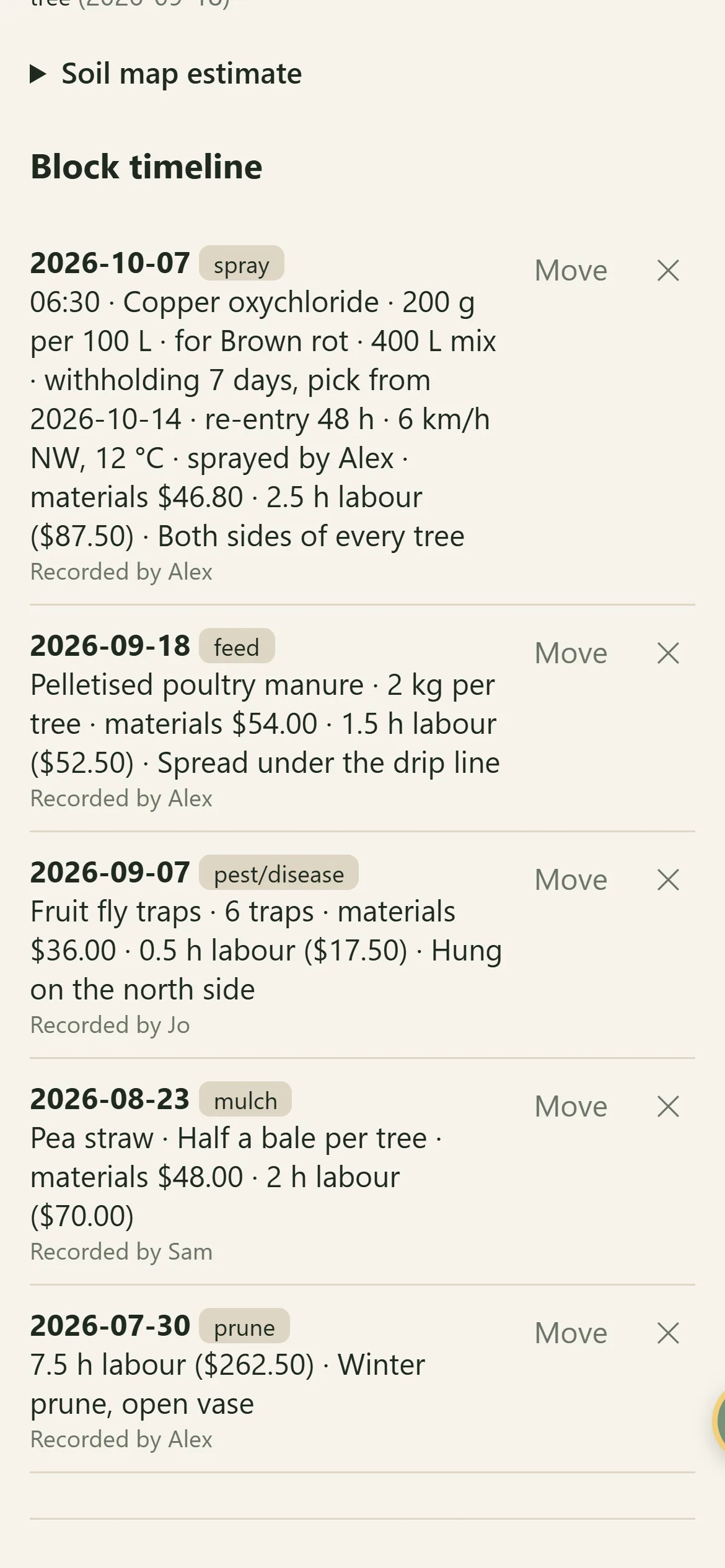
Sprays, feeding, pruning and pests, with the product and amount, for one tree, a block or the whole orchard. Bulk logging records the same job on a row, a block or any trees you pick at once, so a morning of pruning is a few taps, not a few dozen. Where a team shares the property, each entry shows who recorded it. The work log exports to a spreadsheet.
A spray also keeps the target, rate, who sprayed it, the weather at the time, and the withholding period and re-entry interval from the label. More on spray records →
Out in the paddock, the capture button takes a photo, voice memo or note with the time and place. Sort it into the right tree's record later.
What the trees and the work cost
Each tree keeps what you paid for it. Each piece of work can keep what the materials cost and roughly how many hours it took. Enter the total for a row or a block and it is shared out evenly across the trees, to the cent. Set the property's currency and an hourly labour rate in Property settings, and the hours are costed at that rate.
- Costs on single trees, blocks, whole orchards, bulk logs, finished jobs and garden beds.
- Each entry shows its materials and labour, for example "materials $16.66 · 0.5 h labour ($17.50)".
- The trees and work log spreadsheets have cost columns: materials, labour hours, labour cost and total.
- The Costs page adds up each season, from the month you choose: by kind, against your budgets, and by orchard and block with the cost per kg harvested. Bills, fuel, insurance and wages go in as expenses, with a photo of the receipt.
Bloom, photos and harvests
- Bloom dates for each tree, shown beside chill hours and frosts from your property's weather.
- A photo strip for each tree through the seasons.
- Harvests in kilograms, bins, crates, boxes or bunches, with a grade (premium, standard, processing or juice, cull) and who picked them.
- Enter the crop you expect before picking and see it against the season, kept out of every total.
- Harvests by season (July to June), compared over the last four seasons by variety, orchard, block or tree, with a table by grade.
- A seasonal wheel of bloom, harvest, pruning and hive work.
Soil samples and what you added
Record soil samples for the whole orchard, a block or one tree, with a label and the spot they were taken. Tests of the same spot line up year on year with the lime, gypsum, compost or fertiliser added in between, beside the national soil map's estimate for that spot (Australia only for now).
Who it suits
Small commercial orchards and farm-gate growers, from a few hundred trees to several blocks across more than one property, where a few people work the same trees. If you have ever wondered when a block was last sprayed and with what, which variety paid its way, or whether this year's crop beat last year's, the records answer it. Home orchards can start on the free Backyard plan.
Getting started
- Set up an orchard with its number of rows and trees per row, or import your trees from a spreadsheet.
- Fill in the varieties: tree by tree as you walk the rows, or a whole block or row at once.
- Group trees into blocks by hand, or let Trees n Bees make a block for each variety.
- Record work, bloom and harvests as the season goes. Comparisons build up from the first season.


Planned for coming seasons
Grafting and propagation
Rootstocks, scions and cuttings: what was grafted when, and which ones took.
Pollination over the season
The bloom dates you record for partner varieties compared, with hive strength and harvests side by side.
Questions? See common questions, or all the features of Trees n Bees.